One audit, one plain-English report
Choose the checks you want, run them together, and see every problem in one place, worst first, with what is wrong, why it matters to your customers and how to fix it.


A full website audit, free: one plain-English report. Every problem, worst first, with how to fix it.
Free Quick AuditNo account needed
Features
The 21 checks in the free Quick Audit. 19 run with no account; the Site Crawler and Trust Audit need a free sign-in.
FAQ
Yes. The Quick Audit costs nothing, and you don’t need an account or a card to run it. Type your website address, add your name, and it starts straight away.
Signed out, it runs 19 checks. These cover technical SEO (meta tags, HTML, CSS and JavaScript), structured data (JSON-LD, the Schema Debugger and Rich Snippets), speed (Page Speed, Core Web Vitals and layout shift), accessibility, images, redirects, robots.txt and sitemaps, hreflang, local SEO, security, GDPR and HTTP errors. Sign in with a free account and it adds the Site Crawler and the Trust Audit, which takes it to 21 checks.
It takes about five minutes. There’s a daily free allowance for each connection, and if you reach it the page tells you so, rather than leaving the audit spinning.
The Full Audit runs every audit we have, 35 in total, in one go. On top of the Quick Audit checks, it adds:
Competitor analysis (your site side by side with a competitor’s), the ecommerce crawl, the Google Maps audit, the Geo-Grid (your Maps ranking from a 5×5 grid of points around your business), the Google Business Profile audit, backlinks, internal links, keyword analysis, readability, E-E-A-T, the AEO / AI Visibility Checker, AI Agent Compatibility, AI Visibility tracking and the LLMs.txt auditor.
You give it the extra details it needs, such as a competitor’s URL, a Maps keyword and location, your Business Profile name and up to 10 AI search queries. It takes about ten minutes, needs you to be signed in and uses credits. See Pricing.
When the audit finishes, enter your email address. We send you a verification email with a link to download your report as a PDF. This makes sure the report only goes to someone who can open that inbox.
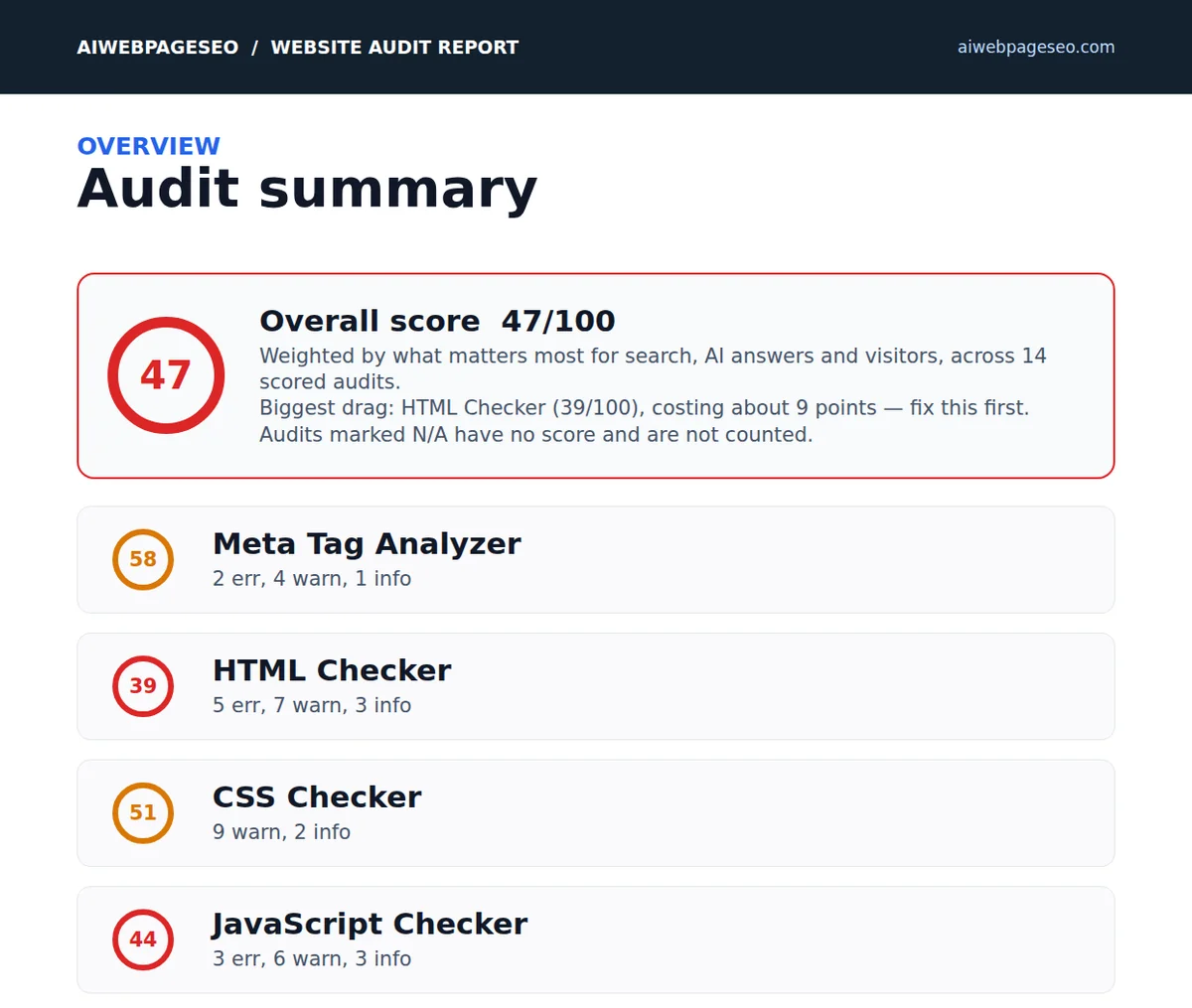
The report starts with an overall score and a summary of every audit, then gives each audit its own section. Problems are listed worst first, and each one says what is wrong, why it matters to your visitors and how to fix it. It ends with an AI fix prompt you can copy, and every section has a link to request a quote if you’d like the work done for you.
No. The audit reads your pages the same way a visitor or a search engine does. Nothing is installed on your site, it never needs your login or your hosting details, and it never writes anything to your server.
The Security Audit is passive: it looks at what your site already sends to every visitor, such as security headers, the TLS certificate, DNS and email authentication records. Anything more active is only run on domains you’ve verified you own.
For most checks, yes. They only read public pages that anyone can already see, so you can audit a competitor, a client’s site or a site you’re thinking of buying.
Security is treated differently. The Security Audit stays passive on any site, and before a security scan runs you tick a box to confirm you own the domain or have written permission from the owner. Active security tests are only available on domains you’ve verified as yours.
It’s a single set of instructions, built from your report, that you copy and paste into an AI coding tool so it can fix the problems for you. It lists the file fixes first, then the suggestions, then the server settings.
It’s written to keep your site safe. It tells the AI tool to work on a copy or staging version, back up every file first, make one fix at a time, and check the page still looks and works the same after each one. It only covers your site’s own files (HTML, CSS and JavaScript). Anything on your server, hosting or DNS is listed separately for you or your host, and the tool is told not to touch it. Suggestions are only listed for you to choose from, never made automatically.
Yes, in the Full Audit. The AEO / AI Visibility Checker scores how visible your site is across ChatGPT, Perplexity, Google AI Overviews and Microsoft Copilot, with specific fixes for each one.
AI Agent Compatibility shows what GPTBot, ClaudeBot and PerplexityBot actually see when they visit your page. It catches problems such as bots being blocked, content that only appears with JavaScript, and missing AI signals. You can also add up to 10 search queries to see whether your site is cited in Google AI Overviews and AI Mode for them, and the LLMs.txt auditor checks your llms.txt file against the published spec.
Yes, once you’re signed in. Advanced controls opens the full audit form. You can tick exactly the checks you want, or use the Quick, Full or None buttons to start from a preset.
You can also choose how many pages to audit (1, up to 10, up to 25 or up to 50), and add your own logo as a PNG so it appears on your report. That’s handy if you’re sending the report on to a client.
Yes. At the end of your audit, use “Request a quote for this work”. Your request automatically includes the file fixes, the server and DNS work, and the suggestions from your report, so you don’t have to list anything yourself. There’s also a box for anything else we should know, such as deadlines or access details.
Every section of the PDF report has a quote link too, so you can ask about just one audit’s fixes. We reply by email with a quote.
It reads every meta tag in the head of your page and checks the ones that decide how your page appears in search results and when it’s shared. That covers your title and its length, your meta description and its length, the viewport tag that makes the page work on phones, your Open Graph title, image and site name (used by Facebook, LinkedIn and WhatsApp previews) and your Twitter/X Card tags.
The report lists every meta tag it found with its full content, so you can see exactly what search engines and social sites are reading. Anything missing or out of range is flagged with the fix, for example a title that will be cut off in Google or a missing share image that leaves your links showing as plain text.
It runs 23 checks on the structure of your page’s HTML: the DOCTYPE, the html, head and body elements, the language attribute, the title and meta description, the viewport and UTF-8 charset, a single H1 and a logical heading order, alt text on images, descriptive link text, an absolute canonical URL, the core Open Graph and Twitter tags, and valid JSON-LD.
It also checks the things that are easy to miss: new-tab links to other sites carrying rel="noopener", every form field having a label, no deprecated HTML elements, external scripts loading with defer or async, and the main and nav landmarks screen readers use to move around the page. Each failure comes with what it breaks and the exact markup to fix it.
It parses your stylesheets and runs 25 checks across six areas: syntax and structure, performance and loading, specificity and maintainability, accessibility, animation and motion, and responsive design. It finds duplicate selectors, !important declarations, heavy use of the universal selector, ID selectors, deeply nested selectors, render-blocking @import rules and @font-face blocks without font-display.
On accessibility it flags outline:none without a replacement focus style, text set below 12px and user-select:none on readable content. It also catches animations that move layout properties (which cause jank and hurt INP), missing prefers-reduced-motion support and large fixed pixel widths that break on phones. Each warning explains the impact and how to fix it, grouped by category so you can see where your CSS is weakest.
It reads your page’s JavaScript and runs 14 checks for problems that affect security, speed and reliability. It flags innerHTML being set with variable content (a common route for cross-site scripting), old var declarations, repeated DOM lookups that should be cached, event listeners that are never removed, and animations driven by setTimeout instead of requestAnimationFrame.
It also confirms the good practice you already have: no document.write(), no eval(), no stray console.log() calls, strict equality, strict mode, error handling on promises and async functions, a sensible script size, and no runaway setInterval timers. Each finding explains why it matters and what to change.
It validates the JSON-LD structured data on your page, the code that tells search engines and AI systems exactly what the page is about. First it checks the JSON itself parses, because one missing comma or unquoted value makes Google ignore the whole block. Then it checks each block’s @context and @type and the properties that type needs.
For an Article that means a headline, author, published and modified dates, an image and a publisher. For a LocalBusiness it means a name and address; for an FAQPage, that every question has an accepted answer; for a HowTo, that it has steps. Every block gets its own list of passes and issues, so you can see which parts of your markup are complete and which need work.
It checks your page against the parts of WCAG 2.2 that can be measured reliably. It measures the text contrast of every text element against WCAG AA, checks every link has descriptive text, every form field has an accessible label and every button has an accessible name, and confirms the page has a lang attribute, a single H1, a logical heading order, main and nav landmarks and a skip-navigation link.
It’s honest about its limits. Text sitting over an image or gradient can’t be measured automatically, so it tells you how many elements to check by eye. Contrast is measured in your page’s default colour scheme, so colours changed by a dark-mode toggle need checking separately. Accessibility problems lock out real visitors and also weaken the signals search engines read.
It audits every image on the page: whether it has alt text, whether it uses a modern format like WebP or AVIF, whether it has width and height attributes (without them the page jumps as images load, which hurts CLS), whether it lazy-loads, and whether it is heavier or larger than it needs to be.
The report shows a table of every image with its format, alt text, dimensions and loading status, plus totals for missing alt text, missing size attributes, images that don’t lazy-load and images not in a next-generation format. Images are usually the biggest part of a page’s weight, so this is often where the quickest speed and LCP improvements come from.
It follows your URL exactly as a browser or search engine would, recording every hop: the status code (301, 302, 307, 308 or 200) and the address at each step, through to the final page. The report shows the whole chain in order, so you can see exactly where each request goes.
It flags redirect chains (one redirect leading to another), redirect loops and temporary 302 redirects where a permanent 301 belongs. Each extra hop slows the page down and can weaken the link value passed to your final URL, so the fix is usually to point every old address straight at its final destination in a single step.
It fetches your robots.txt and your sitemap.xml and checks both. For robots.txt it lists every user-agent it declares, the sitemap references and any disallow rules. It confirms the major AI crawlers, such as GPTBot, ClaudeBot and PerplexityBot, can reach your site, and it shows whether you’ve declared AI usage preferences with the new Content-Usage line.
For the sitemap it checks the XML is valid and counts the URLs, then confirms every URL has a lastmod date, flags changefreq and priority, and catches hash-fragment URLs and duplicates. It also checks the sitemap is referenced from robots.txt. Each part gets its own score, and the report shows a sample of the URLs it found.
Hreflang tags tell Google which version of a page to show in which language or country. The checker finds every hreflang tag on your page and validates them: correct language and region codes, return tags on each alternate page pointing back, no conflicting values, and a proper x-default for visitors who don’t match any version.
If your site is in one language for one country, having no hreflang tags is fine, and the report says so. If you run, or plan to run, several language or regional versions, missing or broken hreflang is a common reason the wrong version ranks in the wrong country, and the checker shows exactly what to add.
It runs your page through Google PageSpeed Insights on mobile and reports the overall performance score with every core metric: First Contentful Paint, Largest Contentful Paint, Total Blocking Time, Cumulative Layout Shift, Speed Index, Time to Interactive and Time to First Byte. Each one is shown against Google’s good and poor thresholds, with what it measures in plain English.
Under that it lists the diagnostics worth acting on, for example how much image data could be saved and on which files, together with the audits your page already passes, such as minified CSS and JavaScript and sensible main-thread work. You see both what’s slowing the page and what’s already right.
Core Web Vitals are the loading, responsiveness and stability measurements Google uses as page-experience signals. This check scores your page’s LCP (how fast the main content appears), CLS (how much the layout jumps), INP (how quickly the page responds to taps and clicks), plus FCP and TTFB, using data from Google’s PageSpeed Insights.
Each metric is rated good, needs improvement or poor against Google’s own thresholds, and every failing metric gets specific fixes: preloading the LCP image, reserving space for images and embeds, breaking up long JavaScript tasks, and so on. The report also includes the full threshold table so you know exactly what target you’re aiming for.
Cumulative Layout Shift is the jolt when a page moves while you’re reading or about to tap something. The CLS Debugger looks for the causes: images without width and height, iframes and embeds with no reserved space, and other elements likely to push content around as the page loads.
It lists every risk element it finds with its risk level, the reason and the fix, and counts total images, unsized images and risk elements. If nothing is found, it tells you so rather than inventing problems. Google treats a CLS under 0.1 as good, and fixing layout shift makes a page feel noticeably more solid to visitors.
It goes through every structured-data block on your page and scores each one from 0 to 100. For each block it shows the type, what it is used for, which rich result it can make the page eligible for, and a full breakdown of every property with its value, so you can see exactly what search engines are reading.
Missing required and recommended properties are listed as warnings, and gaps that matter to AI answer engines are listed separately as AEO issues. It also catches duplicate blocks and invalid markup. The summary shows how many blocks are ready for rich results, how many have issues to fix and how many AI visibility gaps there are.
It checks every JSON-LD block against Google’s rich-result requirements and shows, in one table, the eligibility of each block: the type, its score, whether it is ready for rich results or only supporting schema, and how many issues it has. It’s the quick way to see which enhanced search listings your markup could support.
Blocks with problems are then listed one by one with each issue explained. Valid schema makes a page eligible for rich results rather than guaranteeing them, as Google decides what to show, so the value of the report is removing every reason your markup could be passed over.
It runs 16 checks across consent, disclosure, cookies, tracking, security, third parties, forms and data rights, and gives your site a score and a grade. It looks for a cookie consent banner, checks no tracking cookies are set on first load, and checks trackers such as Google Analytics only load after consent. It also lists every third-party domain the page loads from.
It then reads your privacy policy: that it’s linked and reachable, that it names the ICO as the complaints authority, lists a data-protection contact and states how long data is kept. It checks there’s a cookie policy, a data-rights or delete-account link, consent wording on forms and email sign-ups, and the security headers (HSTS, CSP and frame protection) that help keep visitor data safe.
It checks the signals Google uses to rank businesses in the Maps 3-pack, in two parts. The schema part reads your LocalBusiness structured data for your name, street address, city, postcode, telephone, opening hours, geo coordinates, price range, sameAs profile links and service area. The on-page part checks that your name, phone number and address are visible on the page, that there’s a Google Business Profile link and review content, and that the phone and name in your schema match what’s on the page.
It then gives you the exact name, address and phone to use everywhere, and a list of the directories to be listed on for your country, ranked must-have, high priority and recommended. It finishes with a local SEO checklist to work through in order.
Instead of looking at one page, the Site Crawler follows the links across your site and audits the pages it finds, so problems that only show up site-wide come to light. It gives each page a score, lists the issues it found, and builds a prioritised fix list across the whole site.
It’s how you find broken internal links and orphaned pages (pages nothing else links to, which search engines struggle to discover), as well as issues repeated on many pages at once, such as a template fault. The Site Crawler is part of the Quick Audit when you’re signed in with a free account.
It runs 64 passive checks: security headers, including how strict your Content-Security-Policy really is, HSTS and preload, frame protection, Referrer-Policy and Permissions-Policy. It covers your TLS certificate, protocol and cipher, cookie flags, mixed content, subresource integrity and whether plain http:// redirects to https://. It looks for secrets, revealing comments or source maps left in the page, and error pages that leak versions or stack traces.
It also checks your mail and DNS security (SPF, DMARC, DKIM, MTA-STS, TLS-RPT, DANE, CAA and DNSSEC), server fingerprinting, known CVEs for any detected versions, CMS exposure, robots.txt and security.txt. Every result is marked pass, fail, warning, info or not applicable, with the fix and the OWASP and CWE references. Everything it does is passive, looking only at what your site already sends to every visitor.
It looks at your site the way a cautious visitor, search engine or security tool might before trusting it. It checks the age of your domain and its WHOIS record, your reputation with Google Web Risk, your backlink spam score and authority signals, whether real contact and identity details are published, and your robots.txt.
A new domain, a poor reputation, spammy links or no clear owner are exactly the things that make people and systems hesitate, and they can quietly hold back how far a site is trusted and cited. The audit is passive and works on any public website. It’s included in the Quick Audit when you’re signed in with a free account.
It checks the pages your site links to and records the HTTP status each one returns, so broken pages are found before Google or your visitors find them. Every 404 (not found), 410 (gone), 500, 502 and 503 (server errors) is reported, along with redirects and the pages that loaded correctly.
The results are listed worst first, with the address, the status code, what it means and the page the link was found on, so you know exactly which link to fix and where it lives. The summary counts pages scanned, total errors, client and server errors, redirects and pages returning 200 OK.
How it works
Type your address, add your name and choose Quick or Full.
Every check runs together. Quick takes about 5 minutes, Full about 10.
Every problem, worst first, with what is wrong and how to fix it.
Get the PDF by email, or copy the AI fix prompt for your coding tool.
Free Quick AuditNo account needed
Please enter a valid URL and your name.
Starting…
This takes around 5–10 minutes. You can leave this open.
Choose the checks you want, run them together, and see every problem in one place, worst first, with what is wrong, why it matters to your customers and how to fix it.